Batch flat-pattern and DXF export
Export each intended sheet-metal item once with verifiable geometry and a complete result log. Work on a copy first. Record application version, units and active document/configuration. Names below identify the catalogued workflow; they do not claim a particular button layout or verified implementation.
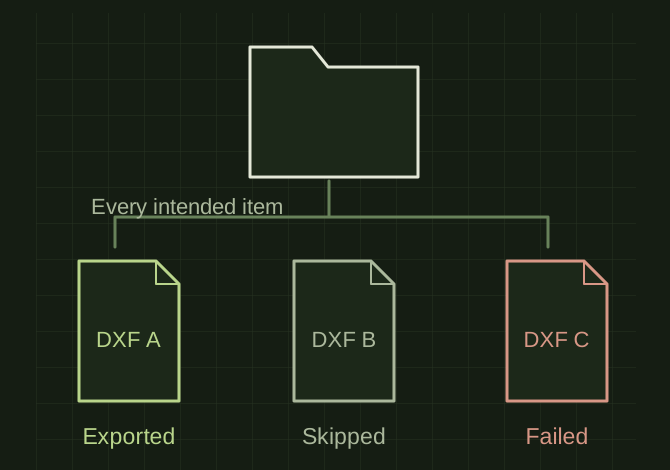
A batch needs an outcome for every item
 OPEN FULL SIZE ↗
- Enumerate
- Parts, configurations and bodies
- Name
- Collision-safe files
- Reconcile
- Every intended item in the manifest
TECHNICAL NOTES///
Export each intended sheet-metal item once with verifiable geometry and a complete result log.
GOALRun the first test described in this guide and record the result for batch flat-pattern and dxf export.
PREPARATION / NOTES
Work on a copy first. Record application version, units and active document/configuration. Names below identify the catalogued workflow; they do not claim a particular button layout or verified implementation.
EQUIPMENT
- CAD / automation tool
- Representative test model
- Measurement or inspection method
STEPS
- Enumerate parts, configurations and sheet-metal bodies; define duplicate and quantity handling.
- Rebuild each eligible item, select its correct flat pattern and apply approved layer/orientation rules.
- Create collision-safe filenames and export to a controlled destination.
- Reopen representative outputs and record every item as exported, skipped with reason or failed with error.
TROUBLESHOOTING
- A top-level batch success must not hide failed parts. Duplicate component instances are not automatically separate unique files. Do not overwrite a different body with the same name.
THINGS TO WATCH FOR
A top-level batch success must not hide failed parts. Duplicate component instances are not automatically separate unique files. Do not overwrite a different body with the same name.
RESULTThe export manifest reconciles to the intended item list and includes no silent omissions.
DEVELOPMENT HISTORY///
Imported as an independent manifest record; public copy keeps uncertainty visible.
SPECIFICATION///
RELEASED MATERIAL///
The export manifest reconciles to the intended item list and includes no silent omissions.
The record keeps what is known at this revision. Unfinished tests stay unfinished here.