Inventor flat-pattern update automation
Keep derived flat geometry current before dimensions, properties or exports are generated. Work on a copy first. Record application version, units and active document/configuration. Names below identify the catalogued workflow; they do not claim a particular button layout or verified implementation.
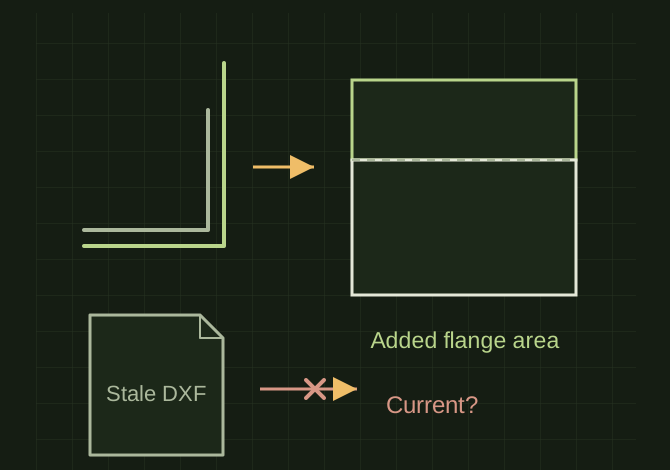
A changed flange changes the flat
 OPEN FULL SIZE ↗
- Update
- Before derived properties and exports
- Check
- Reliefs, orientation and disconnected geometry
- Failure
- Do not relabel stale export current
TECHNICAL NOTES///
Keep derived flat geometry current before dimensions, properties or exports are generated.
GOALRun the first test described in this guide and record the result for inventor flat-pattern update automation.
PREPARATION / NOTES
Work on a copy first. Record application version, units and active document/configuration. Names below identify the catalogued workflow; they do not claim a particular button layout or verified implementation.
EQUIPMENT
- Inventor / iLogic
- Representative test model
- Measurement or inspection method
STEPS
- Check document type and determine whether the flat pattern exists.
- Create it only when the model supports a valid unfold; otherwise stop with the feature failure recorded.
- Update the document and inspect the flat pattern for changed orientation, reliefs or disconnected geometry.
- Refresh dependent properties/exports only after the update succeeds.
TROUBLESHOOTING
- A stale successful DXF should not remain labeled as current after a failed update. Suppressed or model-state geometry can alter the flat pattern.
THINGS TO WATCH FOR
A stale successful DXF should not remain labeled as current after a failed update. Suppressed or model-state geometry can alter the flat pattern.
RESULTChanging a flange in a test copy updates both the flat geometry and its reported extents.
DEVELOPMENT HISTORY///
Imported as an independent manifest record; public copy keeps uncertainty visible.
SPECIFICATION///
RELEASED MATERIAL///
Changing a flange in a test copy updates both the flat geometry and its reported extents.
The record keeps what is known at this revision. Unfinished tests stay unfinished here.