Cold-Smoker Cap / A Scan to Draw Over
I wanted to draw over a scan of a cold-smoker cap, not print the scanned surface. When asked about the missing areas, I said they were not important. The scan reached Shapr3D, where its position and orientation made sketching awkward. This project preserves that practical stopping point and the proposed setup for tracing the rim and dome without first rebuilding every missing triangle.
 CAD-SMOKER-CAP-001
TECHNICAL NOTES///
The cap scan had gaps, but the goal was a drawing reference. Getting it into Shapr3D exposed the more immediate problem: a tilted object far from the origin and no active sketch plane.
This project began with a narrow requirement: use the scan as a guide. That made the missing surface less important than the setup needed to draw over it.
I opened with a scan that I only needed for reference. The plan was to draw over it, not use the scanned surface as the printable model. When the gaps came up, I clarified that the missing parts were not important. That established the scope: retain the useful outline and profile, and measure any missing feature that later becomes necessary.
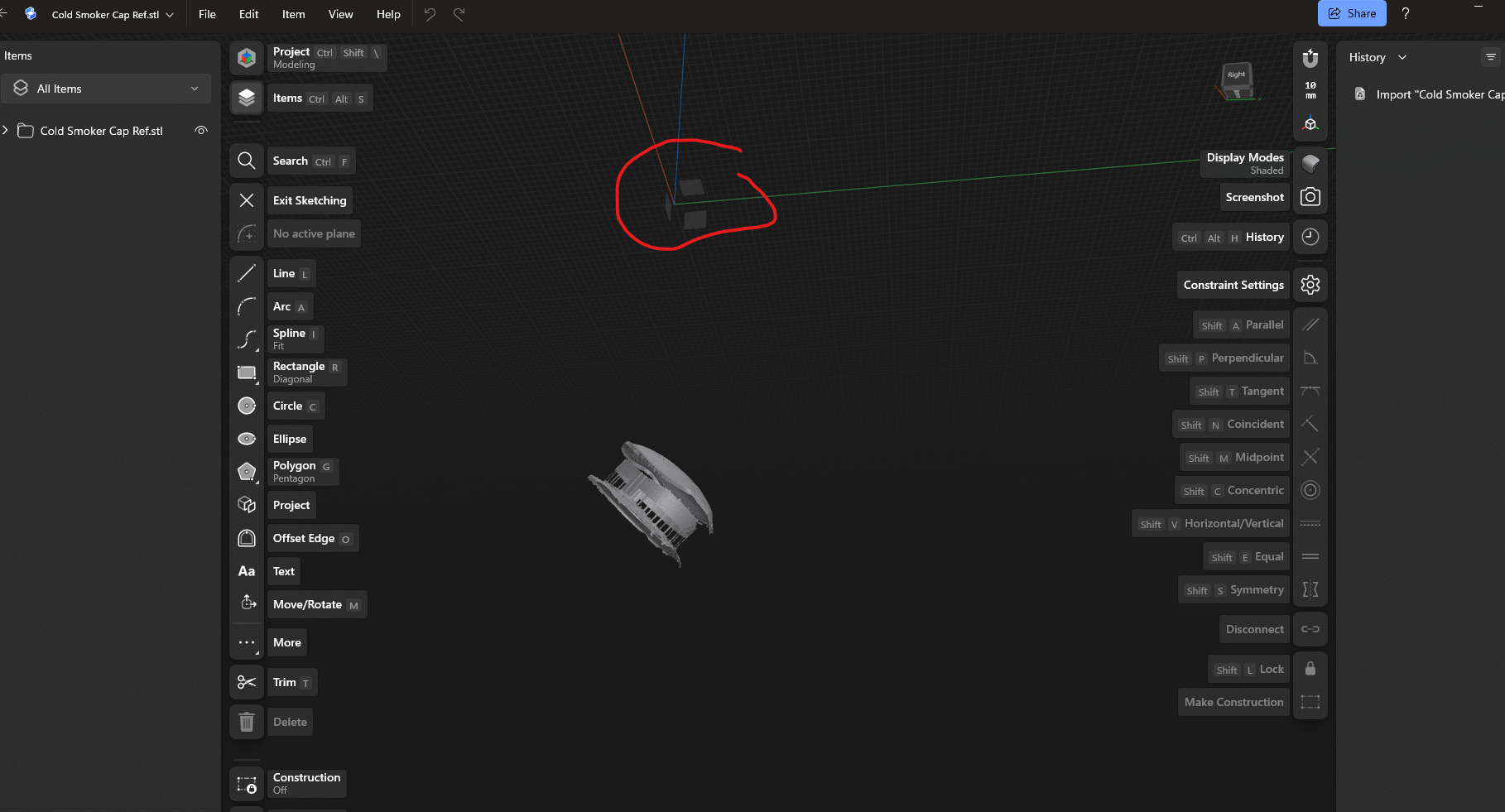
The next screenshot supplied a real checkpoint. The scan was in Shapr3D under the name Cold Smoker Cap Ref.stl. I asked how to draw from it with the origin so far away. The image shows the reference below the axes, tilted, while the sketch interface says No active plane. A successful import had not yet become a convenient modeling setup.
The suggested setup was to leave sketch mode, select the whole mesh, and use Move/Rotate to bring it near the origin and turn it into a useful orientation. Shapr3D's gizmo documentation distinguishes moving an object with the arrows from moving the gizmo center to change its pivot. That small distinction directly addressed the difficulty shown in the screenshot. The history does not confirm that this repositioning was completed.
After positioning, the proposed drawing approach was to choose a sketch plane and work from straight-on views: an outline for the rim and a side profile for the domed top. Clean curves should represent the intended part, with dimensions checked on the physical cap. The scan supplies context; a noisy surface is not a reason to copy every bump into the new model.
MeshLab simplification was discussed as an optional way to make a heavy reference easier to handle. It was not a requirement to close every hole or turn this reference into a solid. The cap record ends at the imported reference and proposed tracing setup. The later discussion of a small outdoor vent does not explicitly establish that it was this same cap, so its dimensions and material suggestions are not assigned to this project.
DEVELOPMENT HISTORY///
The user requested a tracing workflow, confirmed that missing scan regions were unimportant, and then showed the imported cap in Shapr3D.
Published the reference-workflow notes and the supplied Shapr3D screenshot.
SPECIFICATION///
RELEASED MATERIAL///
The scan was imported successfully. The screenshot and user report establish that milestone; completed alignment, dimensioned CAD, printing, and installation are not documented.
The record keeps what is known at this revision. Unfinished tests stay unfinished here.