Manufacturing route/configuration/note tools
Keep manufacturing routes, model configurations and drawing notes synchronized without losing their different purposes. Work on a copy first. Record application version, units and active document/configuration. Names below identify the catalogued workflow; they do not claim a particular button layout or verified implementation.
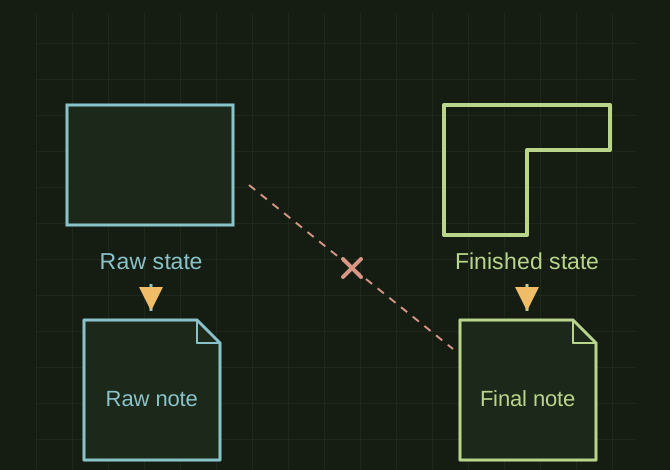
The note must describe the modeled stage
 OPEN FULL SIZE ↗
- Map
- Route to properties, suppression and notes
- Verify
- Drawing references chosen configuration
- Preserve
- Unselected configurations
TECHNICAL NOTES///
Keep manufacturing routes, model configurations and drawing notes synchronized without losing their different purposes.
GOALRun the first test described in this guide and record the result for manufacturing route/configuration/note tools.
PREPARATION / NOTES
Work on a copy first. Record application version, units and active document/configuration. Names below identify the catalogued workflow; they do not claim a particular button layout or verified implementation.
EQUIPMENT
- CAD / automation tool
- Representative test model
- Measurement or inspection method
STEPS
- Define allowed routes and which configurations represent each manufacturing stage.
- Map a route to required properties, feature suppression and approved note text.
- Apply the changes to the chosen scope, rebuild and flag missing prerequisites.
- Verify the drawing references the correct configuration and the notes match the modeled state.
TROUBLESHOOTING
- Do not change all configurations when only one was selected. Notes must not claim an operation absent from the manufacturing plan.
THINGS TO WATCH FOR
Do not change all configurations when only one was selected. Notes must not claim an operation absent from the manufacturing plan.
RESULTA route change produces a consistent configuration, property set and drawing note package.
DEVELOPMENT HISTORY///
Imported as an independent manifest record; public copy keeps uncertainty visible.
SPECIFICATION///
RELEASED MATERIAL///
A route change produces a consistent configuration, property set and drawing note package.
The record keeps what is known at this revision. Unfinished tests stay unfinished here.