Scanning outdoors and in dim shop conditions
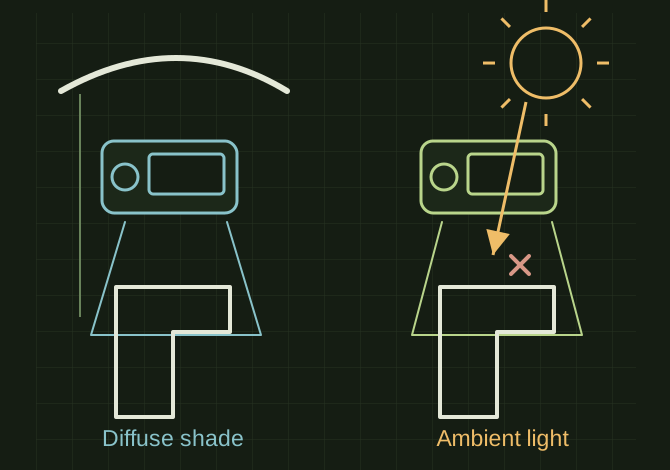
Control both the projected-light environment and camera exposure. Dimness and direct sun cause different problems.
Light and overlap affect coverage
 OPEN FULL SIZE ↗
- Control
- Ambient light and exposure
- Maintain
- Overlap and working distance
- Inspect
- Short test pass before full capture
TECHNICAL NOTES///
Control both the projected-light environment and camera exposure. Dimness and direct sun cause different problems.
GOALRun the first test described in this guide and record the result for scanning outdoors and in dim shop conditions.
EQUIPMENT
- Scanner / mesh workflow
- Representative test model
- Measurement or inspection method
STEPS
- Check the exact scanner mode’s permitted ambient conditions and work in stable shade where practical.
- Secure the object and use approved surface preparation or markers if its geometry/finish gives poor tracking.
- Adjust exposure while viewing the live coverage indicator. Move slowly enough to maintain overlap and keep the working distance consistent.
- Capture a short test, inspect holes/noise and only then scan the full object.
TROUBLESHOOTING
- A scanner with its own light still may struggle with sunlight, black surfaces or reflections. Moving shadows and vibrating parts reduce consistency. Do not apply spray to a surface without permission.
THINGS TO WATCH FOR
A scanner with its own light still may struggle with sunlight, black surfaces or reflections. Moving shadows and vibrating parts reduce consistency. Do not apply spray to a surface without permission.
RESULTThe test pass maintains tracking and produces repeatable features across overlapping captures.
DEVELOPMENT HISTORY///
Imported as an independent manifest record; public copy keeps uncertainty visible.
SPECIFICATION///
RELEASED MATERIAL///
The test pass maintains tracking and produces repeatable features across overlapping captures.
The record keeps what is known at this revision. Unfinished tests stay unfinished here.