Fallback font handling in scripted CAD
Make scripted labels fail clearly or substitute predictably when the preferred font is missing.
A fallback font can change the fit
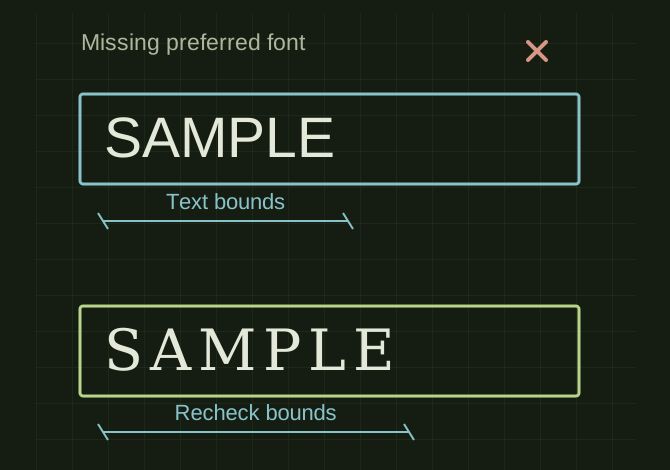 OPEN FULL SIZE ↗
- Fallback
- Ordered permitted paths
- Measure
- Generated text bounds
- If absent
- Stop clearly rather than export unlabeled
TECHNICAL NOTES///
Make scripted labels fail clearly or substitute predictably when the preferred font is missing.
GOALRun the first test described in this guide and record the result for fallback font handling in scripted cad.
EQUIPMENT
- CAD / automation tool
- Representative test model
- Measurement or inspection method
STEPS
- Store a preferred font path and an ordered list of permitted fallback paths.
- Check file existence and supported font loading before creating the ShapeString.
- Measure the generated text bounds and fit it within the allowed label area without silently changing the model’s reference dimensions.
- Log which font was used. If no valid font exists, stop label creation with a clear error rather than exporting an unlabeled part as complete.
TROUBLESHOOTING
- A replacement font can change character width, counters and stroke thickness. Do not assume identical typography across computers or redistribute fonts without permission.
THINGS TO WATCH FOR
A replacement font can change character width, counters and stroke thickness. Do not assume identical typography across computers or redistribute fonts without permission.
RESULTRun once with the preferred font and once without it; both outcomes must be explicit and geometrically checked.
DEVELOPMENT HISTORY///
Imported as an independent manifest record; public copy keeps uncertainty visible.
SPECIFICATION///
RELEASED MATERIAL///
Run once with the preferred font and once without it; both outcomes must be explicit and geometrically checked.
The record keeps what is known at this revision. Unfinished tests stay unfinished here.