Selecting an edge chain for a fillet
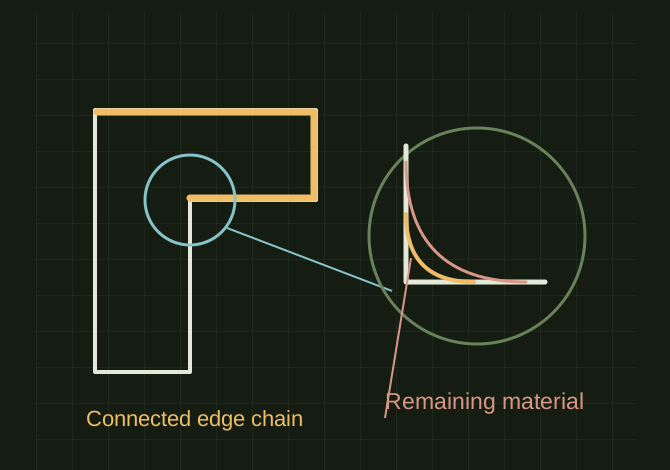
A fillet should follow the intended continuous edge set and leave enough surrounding material.
Follow the intended edge chain
 OPEN FULL SIZE ↗
- Select
- Continuous intended edges
- Inspect
- Back edges and narrow areas
- Limit
- Thin features and sliver edges
TECHNICAL NOTES///
A fillet should follow the intended continuous edge set and leave enough surrounding material.
GOALRun the first test described in this guide and record the result for selecting an edge chain for a fillet.
EQUIPMENT
- CAD / automation tool
- Representative test model
- Measurement or inspection method
STEPS
- Select the first edge and inspect which connected edges the application highlights.
- Add only the needed neighboring edges, checking around the back of the body as well.
- Apply a small radius first and increase gradually while watching corners and narrow areas.
- If the operation fails, isolate one edge or chain at a time to locate the limiting geometry.
TROUBLESHOOTING
- Tangent continuity, tiny sliver edges and intersecting fillets affect propagation. Selecting a face or body is not the same as selecting its perimeter. A larger radius can consume a thin feature.
THINGS TO WATCH FOR
Tangent continuity, tiny sliver edges and intersecting fillets affect propagation. Selecting a face or body is not the same as selecting its perimeter. A larger radius can consume a thin feature.
RESULTThe fillet covers the intended chain and the model still rebuilds and exports as expected.
DEVELOPMENT HISTORY///
Imported as an independent manifest record; public copy keeps uncertainty visible.
SPECIFICATION///
RELEASED MATERIAL///
The fillet covers the intended chain and the model still rebuilds and exports as expected.
The record keeps what is known at this revision. Unfinished tests stay unfinished here.