Stripe test-payment setup
Use Stripe’s test environment to verify the complete order flow before accepting real payments.
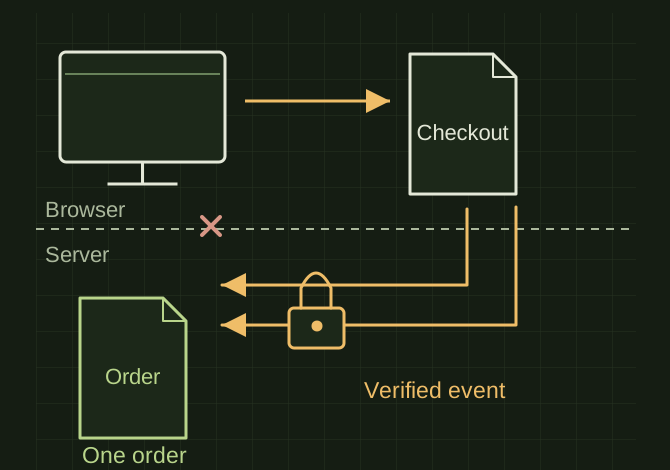
The order follows a verified event
 OPEN FULL SIZE ↗
- Environment
- Test
- Authority
- Verified server-side payment event
- Duplicate handling
- One fulfilled order
TECHNICAL NOTES///
Use Stripe’s test environment to verify the complete order flow before accepting real payments.
GOALRun the first test described in this guide and record the result for stripe test-payment setup.
STEPS
- Create test products/prices and keep the secret API key on the server. Create Checkout Sessions using trusted server-side product and price data.
- Use Stripe’s documented test payment methods; show cancel and success paths that remain understandable if a customer closes the page.
- Verify webhook signatures and make fulfillment idempotent so repeated events do not create duplicate orders. Confirm payment state server-side before delivery.
- Test success, decline, abandonment and duplicate delivery. Keep test orders separate from live records.
TROUBLESHOOTING
- A success-page visit is not proof of payment. Never expose secret keys in browser code or accept a price sent by the browser without validation. Do not switch to live billing as part of importing this article.
THINGS TO WATCH FOR
A success-page visit is not proof of payment. Never expose secret keys in browser code or accept a price sent by the browser without validation. Do not switch to live billing as part of importing this article.
RESULTThe test purchase should create exactly one correct order after a verified payment event, even if the customer never returns to the site.
DEVELOPMENT HISTORY///
Imported as an independent manifest record; public copy keeps uncertainty visible.
SPECIFICATION///
RELEASED MATERIAL///
The test purchase should create exactly one correct order after a verified payment event, even if the customer never returns to the site.
The record keeps what is known at this revision. Unfinished tests stay unfinished here.