SOLIDWORKS Rotation Macro
A conversation-specific public summary of solidworks rotation macro, distilled from the supplied export. The detailed excerpts remain available in the released note file.
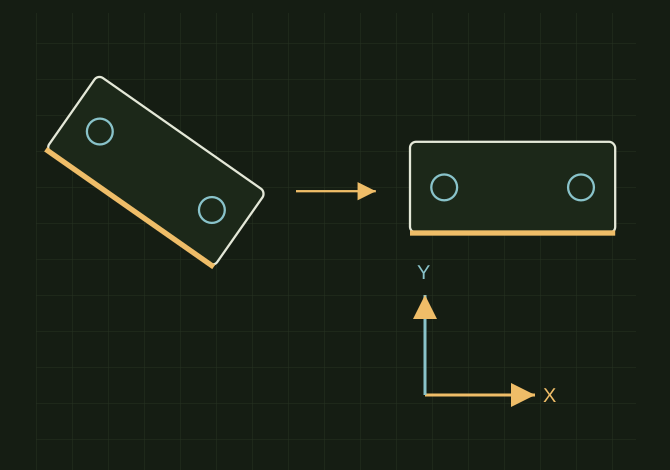
Rotate around the selected edge
 OPEN FULL SIZE ↗
- Pick
- One straight edge
- Horizontal
- Align with the sheet
- Vertical
- Optional 90° direction
TECHNICAL NOTES///
Conversation-specific knowledge extracted from the solidworks rotation macro discussion.
QUESTION / CONTEXTis there a way to precisly roate this view so it looks like the red boxc, if not can we write a macro that works like this, i select a line of the part in the view and it roates it this is solid works 2025
IMPORTANT GUIDANCE
- you click one straight line or visible linear edge in the drawing view
- run the macro
- it rotates that view so the selected line becomes exactly horizontal
- optional: you can enter `90` if you want that line vertical instead
- Use this in SOLIDWORKS 2025 VBA macro:
- Set swApp = Application.SldWorks
- Set swModel = swApp.ActiveDoc
- Set swMathUtil = swApp.GetMathUtility
Extracted from the conversation’s assistant responses and edited for public clarity. See the released note for additional redacted excerpts.
DEVELOPMENT HISTORY///
Matched to the supplied export; key guidance is surfaced separately and the raw transcript remains unpublished.
SPECIFICATION///
RELEASED MATERIAL///
RECOVERED / SPECIFIC NOTE
The record keeps what is known at this revision. Unfinished tests stay unfinished here.