← RETURN TO INDEX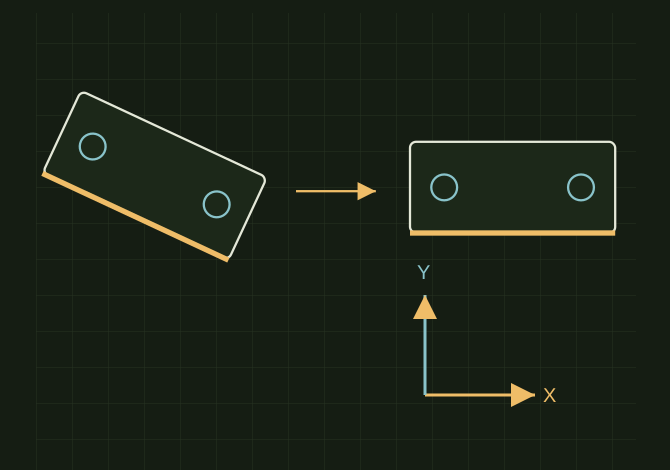 OPEN FULL SIZE ↗
An angled outline is realigned using one straight edge as the export reference.Explanatory drawing based on this record
RECORD LOCATED / 2026.04.23
SolidWorks DXF Rotation Fix
A conversation-specific public summary of solidworks dxf rotation fix, distilled from the supplied export. The detailed excerpts remain available in the released note file.
CHAT-0332REV EXPORT-03
AI narration using Robert's voice. SolidWorks DXF Rotation Fix / short introduction.
A CLOSER LOOK
Let an edge define the X-axis
OPEN FULL SIZE ↗- Reference
- A long straight edge
- Direction
- That edge becomes X
- Output
- Confirm DXF/DWG alignment
CLASSIFICATIONSYS
STATUSRECOVERED / SPECIFIC NOTE
MATERIALCHAT EXPORT / BUILD & TOOLS
DISPOSITIONPUBLIC CONVERSATION EXCERPTS / REDACTED
TECHNICAL NOTES///
Conversation-specific knowledge extracted from the solidworks dxf rotation fix discussion.
EXTRACTED KNOWLEDGE / HOW-TOFROM CONVERSATION
QUESTION / CONTEXTWHEN EXPORTING THIS DXF IT LOOKS ROTATED WEIRD, HOW DO I MAKE IT HORIXZONTAL
IMPORTANT GUIDANCE
- --
- In the DXF/DWG Output panel (left side)
- Go to Output Alignment
- Click the little arrow/axis button next to it
- Then:
- Click a long straight edge (like that bottom edge of your part)
- That becomes your X-axis
- Hit ✔ / OK
Extracted from the conversation’s assistant responses and edited for public clarity. See the released note for additional redacted excerpts.
DEVELOPMENT HISTORY///
2026.04.23EXPORT-04
Matched to the supplied export; key guidance is surfaced separately and the raw transcript remains unpublished.
SPECIFICATION///
SourceSupplied ChatGPT export
CategoryBuild & Tools
Conversation1 user turns / 1 assistant turns
Attachments6 references detected
Public detailExtracted knowledge + excerpts
RELEASED MATERIAL///
WHERE THIS STANDS
RECOVERED / SPECIFIC NOTE
The record keeps what is known at this revision. Unfinished tests stay unfinished here.