Create real text geometry for printed labels, keeping its font and placement reproducible.
PUBLIC KNOWLEDGE VIEWCAD / Scanning / Automation / how-to
SOURCE STATENew reference guidance; not a recovered test result
GOALRun the first test described in this guide and record the result for raised and engraved labels in freecad.
EQUIPMENT
FreeCAD
Representative test model
Measurement or inspection method
STEPS
Create a ShapeString using an available font file and set text, size and tracking.
Place the text relative to stable model references and inspect closed letter outlines.
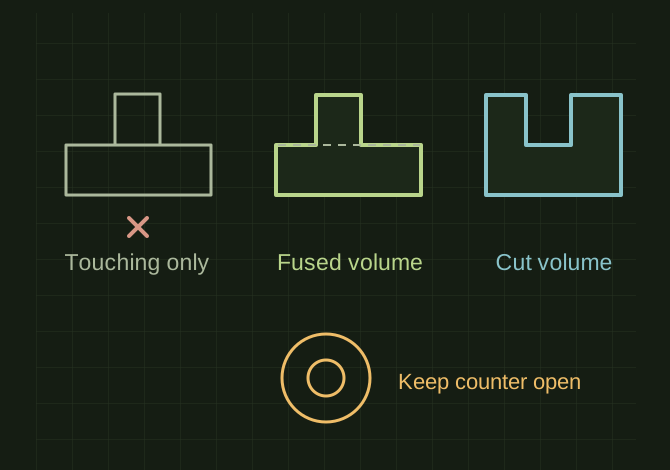
Extrude and fuse for a raised label, or cut an overlapping extrusion for engraving.
Recompute and inspect the final solid, then export and check the slicer preview at the intended scale.
TROUBLESHOOTING
Text that only touches a surface can fail a boolean operation; provide deliberate overlap. Thin serifs and tiny counters may disappear in FDM printing.
THINGS TO WATCH FOR
Text that only touches a surface can fail a boolean operation; provide deliberate overlap. Thin serifs and tiny counters may disappear in FDM printing.
RESULTThe exported mesh contains the label geometry, not just a visible annotation.
 OPEN FULL SIZE ↗