Permanent redirectable QR-code route
Print a stable URL you control, then change its destination later. The QR image can remain physically unchanged.
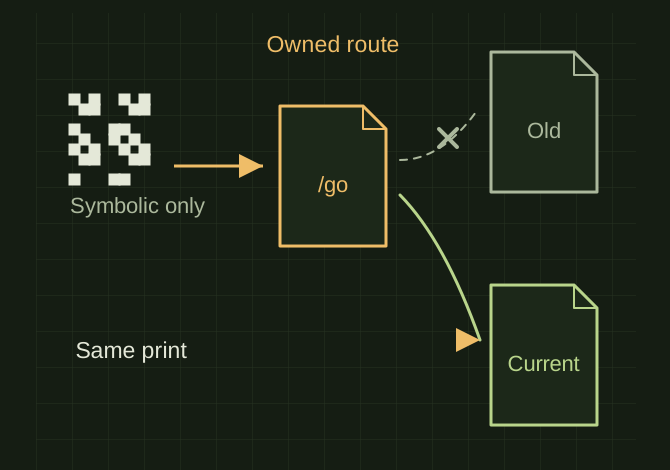
One printed code, a changeable destination
 OPEN FULL SIZE ↗
- Printed content
- Stable owned route
- Changes
- Redirect destination
- Test
- Same printed code after destination change
TECHNICAL NOTES///
Print a stable URL you control, then change its destination later. The QR image can remain physically unchanged.
GOALRun the first test described in this guide and record the result for permanent redirectable qr-code route.
STEPS
- Choose a short path such as https://u225x.com/go and keep it reserved permanently.
- Create a server or hosting redirect to the current destination. A 302 or 307 is a practical choice when that destination is expected to change; avoid long-lived cached permanent redirects for this use.
- Generate the QR from the stable route, not the temporary destination.
- Change the destination in a test, then scan the same printed QR again to verify the new route works.
TROUBLESHOOTING
- Do not build an unrestricted user-supplied redirect target. If using Cloudflare redirect rules, the relevant DNS record must be proxied as their documentation requires. Keep the domain renewed.
THINGS TO WATCH FOR
Do not build an unrestricted user-supplied redirect target. If using Cloudflare redirect rules, the relevant DNS record must be proxied as their documentation requires. Keep the domain renewed.
RESULTThe same printed code should reach the new destination without a replacement image.
DEVELOPMENT HISTORY///
Imported as an independent manifest record; public copy keeps uncertainty visible.
SPECIFICATION///
RELEASED MATERIAL///
The same printed code should reach the new destination without a replacement image.
The record keeps what is known at this revision. Unfinished tests stay unfinished here.