← RETURN TO INDEX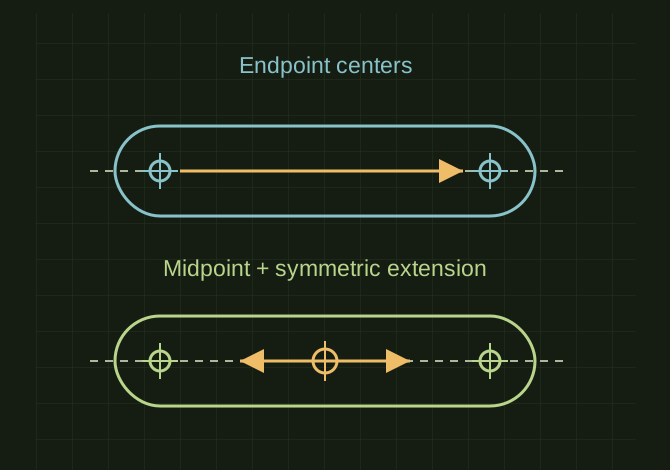 OPEN FULL SIZE ↗
Conceptual straight-slot and centerpoint-slot construction.Explanatory drawing based on this record
RECORD LOCATED / 2026.04.17
Adding Slots in SolidWorks
A conversation-specific public summary of adding slots in solidworks, distilled from the supplied export. The detailed excerpts remain available in the released note file.
CHAT-0058REV EXPORT-03
AI narration using Robert's voice. Adding Slots in SolidWorks / short introduction.
A CLOSER LOOK
Two ways to locate a slot
OPEN FULL SIZE ↗- Tools
- Straight Slot / Centerpoint Slot
- Reference
- Sheet-metal sketch face
CLASSIFICATIONSYS
STATUSRECOVERED / SPECIFIC NOTE
MATERIALCHAT EXPORT / BUILD & TOOLS
DISPOSITIONPUBLIC CONVERSATION EXCERPTS / REDACTED
TECHNICAL NOTES///
Conversation-specific knowledge extracted from the adding slots in solidworks discussion.
EXTRACTED KNOWLEDGE / HOW-TOFROM CONVERSATION
QUESTION / CONTEXTwhat is the easiest way to add slots to a sheet metal part in solid works 2025
IMPORTANT GUIDANCE
- --
- *This is what you should use 90% of the time.
- *Steps:
- Start a sketch on your sheet metal face
- Go to Sketch tab → Slot dropdown
- Pick:
- Straight Slot (most common)
- Centerpoint Slot (best for symmetric)
Extracted from the conversation’s assistant responses and edited for public clarity. See the released note for additional redacted excerpts.
DEVELOPMENT HISTORY///
2026.04.17EXPORT-04
Matched to the supplied export; key guidance is surfaced separately and the raw transcript remains unpublished.
SPECIFICATION///
SourceSupplied ChatGPT export
CategoryBuild & Tools
Conversation10 user turns / 10 assistant turns
Attachments21 references detected
Public detailExtracted knowledge + excerpts
RELEASED MATERIAL///
WHERE THIS STANDS
RECOVERED / SPECIFIC NOTE
The record keeps what is known at this revision. Unfinished tests stay unfinished here.