U225XTHE RECORD REMAINSSEARCH
← RETURN TO INDEX
RECORD LOCATED / 2026.08.09

Truly Wireless 3D Scanners

A conversation-specific public summary of truly wireless 3d scanners, distilled from the supplied export. The detailed excerpts remain available in the released note file.

CHAT-0384REV EXPORT-03
AI narration using Robert's voice. Truly Wireless 3D Scanners / short introduction.
Open notebook ↗
A CLOSER LOOK

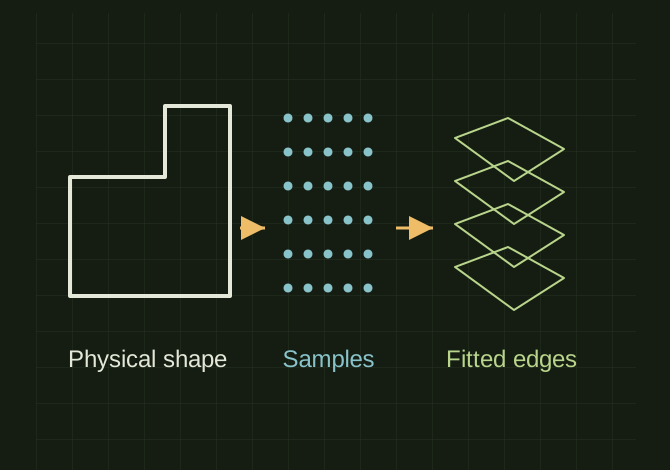
A scan becomes editable geometry in stages

A scan becomes editable geometry in stages. A physical silhouette, sampled surface, polygon mesh and fitted sketch show the different kinds of geometry involved. No scanner ranking or automatic perfect conversion is implied.OPEN FULL SIZE ↗
A physical silhouette, sampled surface, polygon mesh and fitted sketch show the different kinds of geometry involved. No scanner ranking or automatic perfect conversion is implied.Explanatory drawing based on this record
Capture
Physical part → scan
Mesh
STL / PLY / OBJ
Rebuild
Editable sketches and features
CLASSIFICATIONSYS
STATUSRECOVERED / SPECIFIC NOTE
MATERIALCHAT EXPORT / BUILD & TOOLS
DISPOSITIONPUBLIC CONVERSATION EXCERPTS / REDACTED
VIEW FILE ↗

TECHNICAL NOTES///

Conversation-specific knowledge extracted from the truly wireless 3d scanners discussion.

EXTRACTED KNOWLEDGE / HOW-TOFROM CONVERSATION

QUESTION / CONTEXTAre there any truly wireless 3d scanners

IMPORTANT GUIDANCE

  1. *For your use, I'd probably narrow it to two choices: if you want to spend ~$300–600, use a wireless scanner that works with your S24 Ultra. If you're willing to spend ~$1,400, MIRACO is the big jump because you can literally pick it up, walk around a part, scan it, mesh it, and then bring the mode…
  2. *1. Creality Raptor X — best overall if wireless matters
  3. *2. Revopoint MIRACO Plus — best truly standalone experience
  4. *3. Regular MIRACO — cheaper standalone choice
  5. *Physical part → wireless scan → mesh → DezignWorks Mesh Modeler → editable SOLIDWORKS sketches/features → modify part → print/machine/fabricate
  6. *Part → scan → STL/PLY → DezignWorks Mesh Modeler → SOLIDWORKS
  7. *Scanner → PLY/OBJ → MeshLab
  8. clean/align/crop/repair the scan

Extracted from the conversation’s assistant responses and edited for public clarity. See the released note for additional redacted excerpts.

DEVELOPMENT HISTORY///

2026.08.09EXPORT-04

Matched to the supplied export; key guidance is surfaced separately and the raw transcript remains unpublished.

SPECIFICATION///

SourceSupplied ChatGPT export
CategoryBuild & Tools
Conversation16 user turns / 16 assistant turns
Attachments21 references detected
Public detailExtracted knowledge + excerpts

RELEASED MATERIAL///

CHAT-0384-public-note.txtPUBLIC-SAFE CONVERSATION NOTE / UNIQUE FILE
WHERE THIS STANDS

RECOVERED / SPECIFIC NOTE

The record keeps what is known at this revision. Unfinished tests stay unfinished here.
RECORD CHAT-0384DISPOSITION / PUBLIC CONVERSATION EXCERPTS / REDACTEDBUILD 0.4.17