← RETURN TO INDEX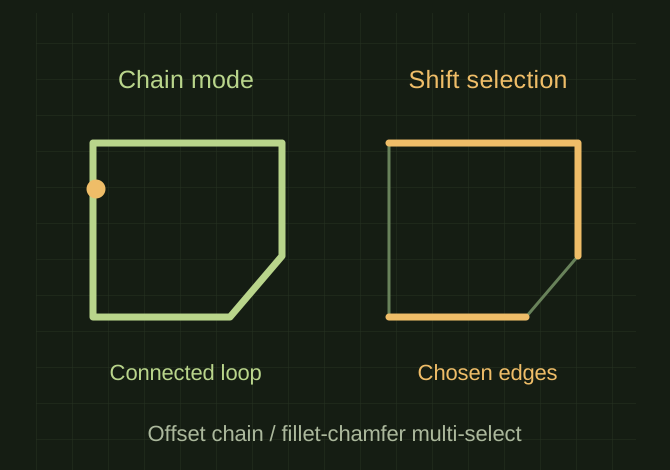 OPEN FULL SIZE ↗
Two edge-selection states on the same generic closed outline.Explanatory drawing based on this record
RECORD LOCATED / 2026.08.30
Shapr3D Loop Selection
A conversation-specific public summary of shapr3d loop selection, distilled from the supplied export. The detailed excerpts remain available in the released note file.
CHAT-0305REV EXPORT-03
AI narration using Robert's voice. Shapr3D Loop Selection / short introduction.
A CLOSER LOOK
An offset chain differs from a manual multi-selection
OPEN FULL SIZE ↗- Offset mode
- Single → Chain
- Other selection
- Shift-select edges for Fillet or Chamfer
CLASSIFICATIONSYS
STATUSRECOVERED / SPECIFIC NOTE
MATERIALCHAT EXPORT / BUILD & TOOLS
DISPOSITIONPUBLIC CONVERSATION EXCERPTS / REDACTED
TECHNICAL NOTES///
Conversation-specific knowledge extracted from the shapr3d loop selection discussion.
EXTRACTED KNOWLEDGE / HOW-TOFROM CONVERSATION
QUESTION / CONTEXTis there a loop[ edge select in shapr3d
IMPORTANT GUIDANCE
- Open Tools → Offset Edge.
- Change the selection type from Single to Chain.
- Click one edge.
- Shapr3D selects the connected chain or closed loop.
- Select the first edge.
- Hold Shift.
- Click each additional edge along the red path.
- Choose Fillet or Chamfer after they’re all highlighted.
Extracted from the conversation’s assistant responses and edited for public clarity. See the released note for additional redacted excerpts.
DEVELOPMENT HISTORY///
2026.08.30EXPORT-04
Matched to the supplied export; key guidance is surfaced separately and the raw transcript remains unpublished.
SPECIFICATION///
SourceSupplied ChatGPT export
CategoryBuild & Tools
Conversation13 user turns / 18 assistant turns
Attachments82 references detected
Public detailExtracted knowledge + excerpts
RELEASED MATERIAL///
WHERE THIS STANDS
RECOVERED / SPECIFIC NOTE
The record keeps what is known at this revision. Unfinished tests stay unfinished here.